Posts

Showing posts with the label clinical trials

Tip #71: Removing Clinical Trials Records from Embase.com and Cochrane CENTRAL

Image
A huge thanks to John Reynolds , MLIS, from the Louis Calder Memorial Library at the University of Miami Miller School of Medicine, who wrote this post! Embase (Elsevier’s Embase.com) has recently added large numbers of clinical trials records to their database and includes them in search results by default. Starting in May 2025 they added 500,000 records from ClinicalTrials.gov and continue to add new records. See their FAQ for more information. Similarly, Cochrane CENTRAL (Wiley) has been adding clinical trials registry records from ClinicalTrials.org and the WHO ICTRP since 2023. It also contains registry records identified through its own Specialized Registers and Handsearch projects. See this FAQ on how trials records are added . While trials records can be useful for many kinds of research, many people may not want trials records in their search results, or may prefer to search trials registries directly. While both Embase and CENTRAL allow searchers to identify and limit search...

Tip #53: "Smart Quotes" aren't so in ClinicalTrials.gov

ClinicalTrials.gov requires phrases be enclosed in quotation marks. Without quotes, it defaults to Boolean OR and finds any study that contains either word. For example,  placebo procedure  returns over 15,000 records, while  "placebo procedure" results in only 39 records.  A database requiring a phrase to be enclosed in quotation marks is commonplace. However, in ClinicalTrials.gov, smart quotes are not recognized as quotation marks. Many searchers, including myself, build searches in Microsoft Word, which defaults to autocorrecting plain (or straight) quotes (" ") to smart (or curly) quotes (‟ ”). In the example below, the first phrase uses straight quotes and the second phrase uses smart quotes: "placebo procedure"   “placebo procedure” If you copy and paste searches directly from Microsoft Word, it's most likely that your search will include smart quotes. ClinicalTrials.gov will ignore your smart quotes and treat your phrase as a Boolean OR.  In ...

Tip #46: Exporting Records from Clinicaltrials.gov into EndNote

Image
Many thanks to Ben Harnke, MLIS from the Strauss Health Sciences Library, University of Colorado (ben.harnke@cuanschutz.edu) for this week's tip!   Overview The following are instructions to export records from clincicaltrials.gov (Trials) to EndNote, with the ultimate goal of sending the records to a screening software, namely Covidence. The new Trials website ( https://www.clinicaltrials.gov /) will only export in JSON (Java Script format) and Comma Separated Values (CSV) formats. We will be using the CSV export format, the format for spreadsheets. These instructions are simply slight modifications to the Clarivate instructions for importing tab-delimited files (spreadsheets) into EndNote. Before proceeding with the following instructions, first decide whether it is necessary to export directly from clinicaltrials.gov to begin with. Cochrane CENTRAL contains records from Trials and is more user friendly. CENTRAL is limited to "randomized and quasi-randomized controlled tri...

Tip #38: Finding Unpublished Research Results in ClinicalTrials.gov

Image
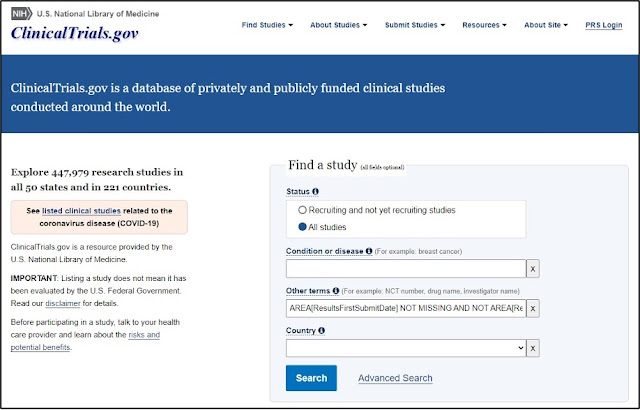
Many thanks to Erica Lake (Outreach Coordinator, NNLM Region 6), and Jimithy Hawkins and Allison Yu from the ClinicalTrials.gov product management team for sharing their expertise and time. ClinicalTrials.gov outlines how to find studies with results published in a medical journals . However, no details are provided on how to find studies with unpublished research results.  Never fear! It is possible to perform this search on both the classic and beta ClinicalTrials.gov websites. Classic ClinicalTrials.gov 1. Navigate to the Find a study search box on the homepage . 2. In the Other term s search field, enter the following search string as shown: AREA[ResultsFirstSubmitDate] NOT MISSING AND NOT AREA[ReferenceType] EXPAND[Concept] "Result" 3. Click the Search button. This search will retrieve all trials that have results posted but do not have any publications relating to those results. Some studies may include other types of publications, such as those relate...

Tip #17: Limit PubMed to Results with ClinicalTrials.gov Data

Image
Many thanks to Erica Lake (Outreach Coordinator, NNLM Region 6 ), and Amanda Sawyer and Jessica Chan from the NCBI PubMed team for this week's tip! A quick and easy way to find PubMed citations linked to clinical studies in the ClinicalTrials.gov database is to use the Secondary Source ID field tag:   clinicaltrials.gov [si] [si] stands for stands for “secondary source ID,” and includes links to data discussed in PubMed citations. ClinicalTrials.gov is one of the data repositories included in this field. A complete list of databank sources can be found here: https://www.nlm.nih.gov/bsd/medline_databank_source.html To limit a PubMed search to citations with links to ClinicalTrials.gov, enter ClinicalTrials.gov [si] followed by your search term(s). For example, to find registered clinical trials utilizing virtual reality, enter the following in the search box: clinicaltrials.gov [si] virtual reality For example, this result from the above search...   ...is linked to this ...