Posts

Showing posts with the label Web of Science

Tip #70: Building a (Database) Creature with the Best Features: An Unscientific Report

Image
It’s alive! Or we wish it were. On June 16th, 2026, the Medical Library Association User Experience Caucus hosted the networking event, “Building a (Database) Creature with the Best Features”, at the Library Evidence Synthesis Services Symposium ( LESSS) .  During this event, more than sixty evidence synthesis librarians across disciplines assembled in an unscientific effort to cobble together their dream database platform based on the ones they search every day.

Tip #68 Searches Gone Wild! Popular Database Platforms and Their Wildcards

Image
Written by Hilary Kraus and Zahra Premji  Take a walk on the wild side! Join us for a deep dive into the world of wildcards. This post provides an introduction to how wildcards work, some potential  pitfalls  of using them, and detailed information about how to use them in many popular database platforms. Wildcards 101 Complex searching often involves looking for various forms and spellings of a word. One common approach to this is the use of wildcards. There are two varieties of wildcard. A mandatory wildcard replaces one letter; an optional wildcard replaces either zero or one letter. How these wildcards function and what syntax is used to operationalize them depends on where you're searching. In this post, we look at the ways commonly used databases (or database platforms) use wildcards. Going forward, we will use root to refer to a collection of Latin alphabet letters to which a wildcard may be applied. Since wildcards are typically executed using a punctuation mar...

Tip #59: Getting Up Close and Personal with Database Proximity Syntax

Image
Written by Hilary Kraus and Zahra Premji Why is proximity searching valuable? In systematic searching, there is an inherent tension between sensitivity and precision. According to the Cochrane Handbook, "Searches for systematic reviews aim to be as extensive as possible in order to ensure that as many of the relevant studies as possible are included in the review. It is, however, necessary to strike a balance between striving for comprehensiveness and maintaining relevance when developing a search strategy." ( Chapter 4, Section 4.4.3: Sensitivity versus precision ) One strategy for achieving this balance is the use of proximity operators. As explained in the Cochrane Handbook's Technical Supplement to Chapter 4, "Use of proximity operators helps to ensure that searches are more sensitive than would be the case with direct adjacency or phrase searching, and can also facilitate ease of searching where there are multiple possible variations of a phrase which would othe...

Favorite Features & Sneaky Solutions: A (Second) Database Tips Lightning Round: View the recording!

On February 19, 2025, the Medical Library Association's User Experience (UX) Caucus held its second database tips lightning round. The event recording, chat transcript, and slide decks can be found in the files section of the UX Caucus' OSF site ! The presenters and their topics, with timestamps of when they appear in the video, were: Sneaky Solution: Searching for Articles on Ethical Values (05:40) Lorraine Porcello, MSLIS, MSIM, Position Title: Lead Librarian, Health Sciences  RSS Feeds for Librarians: Tracking Subtopics and Trends (18:59) Esther Garcia, Senior Health Science Librarian, Texas Woman’s University Using Ovid's Basic Search Function to Build Search Strategies (34:58) Bronwyn Sutherland, Liaison Librarian, Texas Medical Center Library Quotations Around Single-Word Terms in PubMed (46:07) Jules Bailey, Health Sciences Librarian, Florida State University Libraries Special Characters in PubMed (59:23) [apologies, no closed captions for this presentation]  K...

Tip #52: Searching for PMIDs in Other Databases

Image
What is a PMID? A PMID, also known as the PubMed Identifier, is a unique number assigned by the National Library of Medicine to all records included in PubMed. It appears under the citation information on each record. PMIDs do not change over time or during processing and are never reused. Searching for articles using their PMIDs can be a very efficient way to find known items or test searches (e.g., Testing for Article Inclusion in Ovid and Testing for Articles in PubMed ). To search for a set of known records in PubMed, enter a string of PMIDs in the search box without the Boolean "OR" and without the [pmid] field tag. If you use [pmid], you will need to use the Boolean "OR" to combine them. These three searches return the same results: 26104772 11038025 35106283 26104772 OR 11038025 OR 35106283 26104772[pmid] OR 11038025[pmid] OR 35106283[pmid] Below we will highlight some search tips for finding PMIDs across various databases Too long didn't read (tldr) c...

Tip #48: Searching the Topic Fields in Web of Science Core Collection

Image
Many thanks to Zahra Premji, Health Research Librarian from the University of Victoria Libraries ( @ZapTheLibrarian ), for this week's post! We frequently use the Web of Science Core Collection (WoSCC) Topic field for systematic searching in evidence synthesis, because it is a multi-field option that includes relevant fields such as title, abstract, and author-keywords. What is the Topic field searching? According to the Web of Science interface, the Topic field in WoSCC searches "title, abstract and author keywords" (January 10th, 2024).  This is a change from the description that was provided In the past (as recently as November 2023), where the Topic field description specifically mentioned title, abstract, author keywords, and keywords plus . So the removal of Keywords Plus from the Topic field description is a recent change. But you will see below that despite the field description (on the database) not mentioning Keywords plus, the TS field still includes Keywords p...

Tip #14: Testing for Key Article Inclusion in Web of Science

Image
In previous posts, we showed you how to test your searches for inclusion of key articles in PubMed and in Ovid databases . You can recycle your PMID strings to create test sets for other databases, too! I search Web of Science for virtually every SR or scoping review I do, so I usually recycle my list of PMIDs. Here's the syntax: PMID=(12450163 or 15982428 or 27391569 or 27940902 or 28941542 or 29056764 or 31651628 or 31874458 or 32340564 or 32855234) While this list contains 10 PMIDs, only 6 of them are indexed in Web of Science. I need to keep track of how many records the string retrieves in Web of Science the same way I would in MEDLINE. For non-MEDLINE articles, you can use DOIs with the following syntax: DO=(10.1182/blood-2020-143231 OR 10.1093/jac/dkaa016 OR 10.1016/j.jadohealth.2019.11.163 OR 10.1089/trgh.2018.0061 OR 10.1093/ofid/ofz360.2167 OR 10.1016/j.apmr.2019.10.050 OR 10.1177/0333102419859835 OR 10.1111/head.13549 OR 10.1212/CPJ.0000000000000401 OR 10.1080/01658107....

Tip #12: Lemmatization in Web of Science

Image
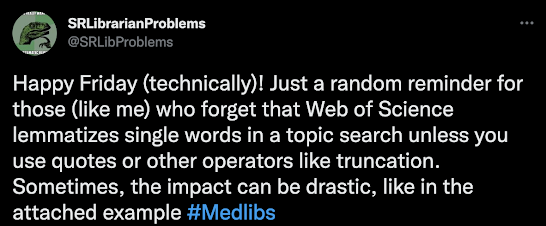
This week's tip is brought to you by the brilliant SRLibrarianProblems Twitter account:        What the heck is lemmatization (lemmatisation)? And why is it important to consider for sensitive (yet precise) searches? Lemmatization is a feature in many databases (we will demonstrate other examples in later blog posts) that attempts to make a relatively simple keyword search more robust (sensitive) behind the scenes. In the SRLibrarianProblems tweet above, you can see that their example shows that the Topic keyword search for aging with and without quotes produces significantly different results. So what is going on between the two versions of this simple search? According to the Web of Science help documentation : "Web of Science automatically applies lemmatization rules to search queries. Lemmatization reduces inflected forms of a word to their lexical root. With lemmatization turned on, a search term is reduced to its "lemma" and inflected forms of the word are...