Posts

Showing posts with the label ebscohost

Tip #70: Building a (Database) Creature with the Best Features: An Unscientific Report

Image
It’s alive! Or we wish it were. On June 16th, 2026, the Medical Library Association User Experience Caucus hosted the networking event, “Building a (Database) Creature with the Best Features”, at the Library Evidence Synthesis Services Symposium ( LESSS) .  During this event, more than sixty evidence synthesis librarians across disciplines assembled in an unscientific effort to cobble together their dream database platform based on the ones they search every day.

Tip #68 Searches Gone Wild! Popular Database Platforms and Their Wildcards

Image
Written by Hilary Kraus and Zahra Premji  Take a walk on the wild side! Join us for a deep dive into the world of wildcards. This post provides an introduction to how wildcards work, some potential  pitfalls  of using them, and detailed information about how to use them in many popular database platforms. Wildcards 101 Complex searching often involves looking for various forms and spellings of a word. One common approach to this is the use of wildcards. There are two varieties of wildcard. A mandatory wildcard replaces one letter; an optional wildcard replaces either zero or one letter. How these wildcards function and what syntax is used to operationalize them depends on where you're searching. In this post, we look at the ways commonly used databases (or database platforms) use wildcards. Going forward, we will use root to refer to a collection of Latin alphabet letters to which a wildcard may be applied. Since wildcards are typically executed using a punctuation mar...

Tip #64: Resource links for EBSCOhost's new UI: roadmaps and release notes and help files, oh my!

EBSCOhost feels like it's taking over the blog right now, but this is a time of transition for the platform, and there's keen interest in understanding how the new UI impacts how we use it now and into the future. Here are some links to keep up with the rapid-fire changes and ways they affect the work of expert searchers! What's new and upcoming: The Research Platforms Roadmap filtered to EBSCOhost New EBSCO User Interfaces – Release Notes New EBSCO User Interface Updates for Advanced Search and Systematic Reviews EBSCO Experience Manager – Release Notes  (ways to customize your institution's interface!) Essential help files: EBSCO Database Help Files  (now in Connect rather than the database platform itself) Searching with Field Codes (downloadable comprehensive list for all databases) From the UX Caucus: EBSCOhost Idea Exchange: A Synthesis of Reported Issues  (December 2025) Problems, tickets, and enhancement requests in thirteen categories (e.g., search box behavio...

Tip #63: Customization of the new EBSCOhost UI: turning on EBSCOhost's Advanced Search Results Page

Image
One big frustration expert searchers have identified in the new EBSCOhost user interface (UI) is the inaccessibility of the search history when viewing search results. Never fear! You can now customize the functionality of the Advanced Search Results Page -- or at least, your institution's EBSCO administrator can. The Advanced version of the Advanced Search Results Page (yes, we recognize that language is a little redundant) puts the Search history toggle between the search boxes and results, similar to the old UI, and offers some of the old search history options. The Search history here operates similarly to, but not exactly the same as, Recent activity in My dashboard in the left navigation sidebar. When toggled open on the Advanced Search Results Page, Search history allows you to: Select sets and combine them with either AND or OR using the provided buttons. (Just typing set numbers and Boolean operators in the search boxes also still works, no matter what search page you...

Tip #62: EBSCOhost Idea Exchange: A Synthesis of Reported Issues

On November 19th, 2025, the User Experience (UX) Caucus of the Medical Library Association hosted the EBSCOhost Idea Exchange, an open forum for the library community to come together with their questions, solutions, outstanding issues, and suggested enhancements for the new EBSCOhost user interface (UI). Hundreds of information professionals contributed their expertise at the event itself, as well as through Padlet posts and collaborative Google Docs. The Evidence Synthesis Methods Interest Group (Association of College & Research Libraries, American Library Association) also shared dozens of extant EBSCO Connect tickets for EBSCOhost's new UI.  The UX Caucus team has synthesized all of these contributions into a single PDF report,  EBSCOhost Idea Exchange: A Synthesis of Reported Issues , available on the UX Caucus OSF site . Please share this resource widely! We have already shared it with representatives at EBSCO at their request.  We know this snapshot report is ...

Tip #59: Getting Up Close and Personal with Database Proximity Syntax

Image
Written by Hilary Kraus and Zahra Premji Why is proximity searching valuable? In systematic searching, there is an inherent tension between sensitivity and precision. According to the Cochrane Handbook, "Searches for systematic reviews aim to be as extensive as possible in order to ensure that as many of the relevant studies as possible are included in the review. It is, however, necessary to strike a balance between striving for comprehensiveness and maintaining relevance when developing a search strategy." ( Chapter 4, Section 4.4.3: Sensitivity versus precision ) One strategy for achieving this balance is the use of proximity operators. As explained in the Cochrane Handbook's Technical Supplement to Chapter 4, "Use of proximity operators helps to ensure that searches are more sensitive than would be the case with direct adjacency or phrase searching, and can also facilitate ease of searching where there are multiple possible variations of a phrase which would othe...

Tip #52: Searching for PMIDs in Other Databases

Image
What is a PMID? A PMID, also known as the PubMed Identifier, is a unique number assigned by the National Library of Medicine to all records included in PubMed. It appears under the citation information on each record. PMIDs do not change over time or during processing and are never reused. Searching for articles using their PMIDs can be a very efficient way to find known items or test searches (e.g., Testing for Article Inclusion in Ovid and Testing for Articles in PubMed ). To search for a set of known records in PubMed, enter a string of PMIDs in the search box without the Boolean "OR" and without the [pmid] field tag. If you use [pmid], you will need to use the Boolean "OR" to combine them. These three searches return the same results: 26104772 11038025 35106283 26104772 OR 11038025 OR 35106283 26104772[pmid] OR 11038025[pmid] OR 35106283[pmid] Below we will highlight some search tips for finding PMIDs across various databases Too long didn't read (tldr) c...

Favorite Features & Sneaky Solutions: A Database Tips Lightning Round: View the recording!

On October 7, 2024, the Medical Library Association's User Experience (UX) Caucus held a database tips lightning round. The event recording, chat transcript, presenter slide decks, and a summary of Q&A and tips culled from the chat can be found in the files section of the  UX Caucus' OSF site ! The presenters and their topics, with timestamps of when they appear in the video*, were: Methodology and Publication Type Filters in EBSCOhost Databases (00:40) Marilia Antunez, MA (LIS), MA,  Life & Allied Health Sciences Librarian, Associate Professor, The University of Akron (OH) Tricky Truncation in ProQuest Databases (07:15) Jocelyn Boice, Associate Professor / Collection Strategies and Data Analysis Librarian, Colorado State University Libraries Embase Query Translator (12:52) Molly Higgins, Systematic Review Librarian, USDA NESR What’s Included in Emtree’s /syn and /br (19:20) Amy Nadell, MSLIS, MA , AHIP-D, Librarian, Banner Health Fun with PMIDs (24:55) Jenni...

Tip #45: Exploding Subject Terms in EBSCO APA PsycInfo vs. EBSCO MEDLINE

Image
Positive update!  EBSCOhost APA PsycInfo, as of September 2025, offers what they're calling "Deep Explode." When explode is selected in the APA Thesaurus, all narrower terms are selected all the way to the bottom of the tree. Rather than being represented by a +, this explosion simply ORs together all the narrower terms in the search box itself. In what is now named (in all EBSCOhost databases in the new user interface) the Subjects authority, you can select the term and check the Explode box: Then use the Add to search button with OR selected in the drop-down menu. The main term and all narrower ones are added to the search box with the appropriate field code (DE), combined with OR. The search history, now called Recent activity, shows the search performed as expected. The information below is now out of date! Happy searching!

Tip #37: Bulk Export from EBSCO

Image
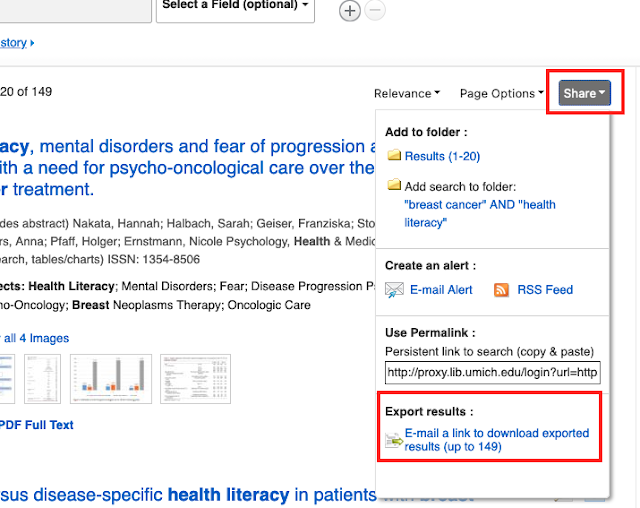
This topic comes up occasionally on Twitter and #medlibs listservs so I thought it would be good to make a post about it! Did you know that there is an email option for bulk exporting from EBSCO databases? It's not without its faults, but when it works, it can save you a lot of time (no more adding page-by-page of results into a folder!). Unless it is enabled for your institution, you may not even be aware that it is an option! From the upper right corner of your results list, click on the "Share" button and scroll down to "Export results." IF YOU DON'T SEE THE EXPORT RESULTS OPTION IN YOUR SHARE SCREEN , you will need to contact EBSCO Technical Support to enable this feature. You can export up to 25,000 records through this option. From the Export Manager screen, you'll be prompted to add your email address and select an output style: Then, hopefully within 5-10 minutes, you should receive an email from support@ebsco.com (make sure to check your spam ...