Posts

Showing posts with the label controlled vocabulary

Tip #54: Embase.com /syn and /br

Image
Many thanks to Amy Nadell, Medical Librarian from Banner Health for this week's post! Embase.com offers two extensions for enhancing search strategies:  "Explosion and all synonyms" /syn and "As broad as possible" /br . Effectively utilizing these extensions will improve the efficiency and comprehensiveness of clinical literature searches. Both /br and /syn are available options from the Emtree thesaurus:  The "Explosion and all synonyms" /syn extension is particularly beneficial when searching for terms related to drugs or medical conditions. It includes the primary Emtree term along with all narrower (child) Emtree terms and synonyms associated with the primary term. The associated synonyms are listed on the Emtree record. You also have the option of copying the list of synonyms from this screen for pasting into the search screen directly (helpful if you want to limit to a specific field): When you use /syn , you do not need to manually list every...

Tip #45: Exploding Subject Terms in EBSCO APA PsycInfo vs. EBSCO MEDLINE

Image
Positive update!  EBSCOhost APA PsycInfo, as of September 2025, offers what they're calling "Deep Explode." When explode is selected in the APA Thesaurus, all narrower terms are selected all the way to the bottom of the tree. Rather than being represented by a +, this explosion simply ORs together all the narrower terms in the search box itself. In what is now named (in all EBSCOhost databases in the new user interface) the Subjects authority, you can select the term and check the Explode box: Then use the Add to search button with OR selected in the drop-down menu. The main term and all narrower ones are added to the search box with the appropriate field code (DE), combined with OR. The search history, now called Recent activity, shows the search performed as expected. The information below is now out of date! Happy searching!

Tip #41: Hyphens in Ovid EMBASE: the Long and Short of it.

Image
When is a hyphen not a hyphen? When it is a longer hyphen. Dashes range in size from the most narrow, known as a hyphen , to the the slightly wider en dash , to the widest em dash . The en dash is used to represent a span or range of numbers, dates, or time. The em dash can take the place of commas, parentheses, and colons. Unfortunately, neither is meant to appear in your search query in Ovid EMBASE .  Two-part or "hyphenated"  used-for terms in Emtree (EMBASE's thesaurus) on the Ovid platform appear to have either en or em dashes instead of hyphens. I discovered that if you paste one of these "hyphenated" terms into the search box, it returns an unsupported characters error .   For example, if you copy/paste  harmal−d , a used-for term for the medication  tamsulosin ,   into the search box, it will return an unsupported characters error. However, if you replace the long hyphen by typing the hyphen key, your search will work. I contacted Ovid Suppor...

Tip #28: Exploding MeSH - PubMed vs. Ovid MEDLINE

Image
 A few years ago I ran into a search quirk when translating a lengthy search from PubMed to Ovid MEDLINE. My Ovid results were significantly larger and it wasn't immediately obvious what was happening. After much testing and consulting with my colleagues (thanks, Mark MacEachern !), we finally pinned it down to a single MeSH term returning vastly different results between the two platforms .   Ovid - exp Food/ 1,428,580 results PubMed - "Food"[Mesh] 701,490 results We figured out what was causing the difference, but there was nothing in the help documentation that explained why it was happening. Even though the searches appeared to be the same, both MeSH terms were exploded, the platforms appeared to be handling them differently. I had to reach out to Ovid to get an answer for my remaining question. Over the course of a few weeks and many emails, they were finally able to provide a clear explanation: Ovid was including “Drug Terms” in the explode, where PubMed was not...

Tip #25: Using Subheadings in PubMed

Image
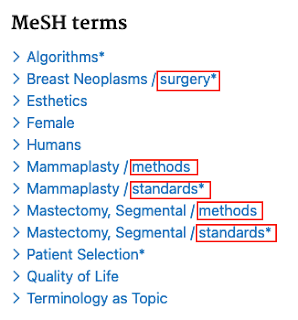
What is a Subheading? Subheadings allow searchers to improve the precision of a search that uses controlled vocabulary by further focusing on a narrower aspect of the topic. Here's an example of how subheadings (or qualifiers) are displayed for an indexed article in PubMed. Subheadings (highlighted in red) appear to the right of a slash following the Medical Subject Heading (MeSH). How to Use Subheadings in PubMed To build a PubMed search using subheadings, you have a few different options depending on the type of search you need. You can start from the MeSH database to build a search using Medical Subject Headings with subheadings applied. Find the MeSH term of interest, then from the record page you can select various subheadings that are relevant to that topic, and click "Add to search builder" to create the search. Click "Search PubMed" to run your search.     In the PubMed searches below, you'll see that the search with the " surgery " subhe...

Tip #2: Check for erroneous computer indexing in Embase

Image
 I recently sought help from colleagues on the expertsearching listserv  regarding puzzling results I was seeing in Embase (in this case, on the Ovid platform). I was searching for articles about the category of medical trainees known in the USA as residents. Here's the scope note for the EMTREE term "resident": (For screen reader users: The scope note cites the Dorland's definition, "a graduate and licensed physician receiving training in a specialty, usually in a hospital," and states this subject heading is synonymous with "interns and residents, resident doctor, resident physician, resident surgeon, surgery resident, surgical resident.") So far, so good, right? Well, here are the first 5 results for exp resident/ :  COVID-19 in French Nursing Homes during the Second Pandemic Wave: A Mixed-Methods Cross-Sectional Study COVID-19 vaccine effectiveness against laboratory confirmed symptomatic SARS-CoV-2 infection, COVID-19 related hospitalizations ...