Posts

Showing posts with the label cinahl

Tip #57: Using Quotes Around Single-Word Terms in PubMed + Other Databases

Image
Many thanks to Jules Bailey, Health Sciences Librarian at Florida State University Libraries, for this week's tip! As librarians and search experts, we are all accustomed to "phrase searching" where putting two or more words together in "quotation marks" looks for those words together in that order in the search results rather than separately anywhere in an article or other resource. However, we don’t typically expect that adding quotation marks versus leaving them off would make a difference for single-word terms, as can be seen here in an example from Embase. Result #1 shows how Embase translates a search for discrimination typed into the basic search box—it yields results for the Emtree term ‘discrimination’/exp or the plain keyword. Embase also shows ‘single quotations’ in the search history, regardless of whether the typed-in search used those or "double quotations". In short, Embase yields the same number of results for a single-word term with an...

Tip #52: Searching for PMIDs in Other Databases

Image
What is a PMID? A PMID, also known as the PubMed Identifier, is a unique number assigned by the National Library of Medicine to all records included in PubMed. It appears under the citation information on each record. PMIDs do not change over time or during processing and are never reused. Searching for articles using their PMIDs can be a very efficient way to find known items or test searches (e.g., Testing for Article Inclusion in Ovid and Testing for Articles in PubMed ). To search for a set of known records in PubMed, enter a string of PMIDs in the search box without the Boolean "OR" and without the [pmid] field tag. If you use [pmid], you will need to use the Boolean "OR" to combine them. These three searches return the same results: 26104772 11038025 35106283 26104772 OR 11038025 OR 35106283 26104772[pmid] OR 11038025[pmid] OR 35106283[pmid] Below we will highlight some search tips for finding PMIDs across various databases Too long didn't read (tldr) c...

Tip #45: Exploding Subject Terms in EBSCO APA PsycInfo vs. EBSCO MEDLINE

Image
Positive update!  EBSCOhost APA PsycInfo, as of September 2025, offers what they're calling "Deep Explode." When explode is selected in the APA Thesaurus, all narrower terms are selected all the way to the bottom of the tree. Rather than being represented by a +, this explosion simply ORs together all the narrower terms in the search box itself. In what is now named (in all EBSCOhost databases in the new user interface) the Subjects authority, you can select the term and check the Explode box: Then use the Add to search button with OR selected in the drop-down menu. The main term and all narrower ones are added to the search box with the appropriate field code (DE), combined with OR. The search history, now called Recent activity, shows the search performed as expected. The information below is now out of date! Happy searching!

Tip #37: Bulk Export from EBSCO

Image
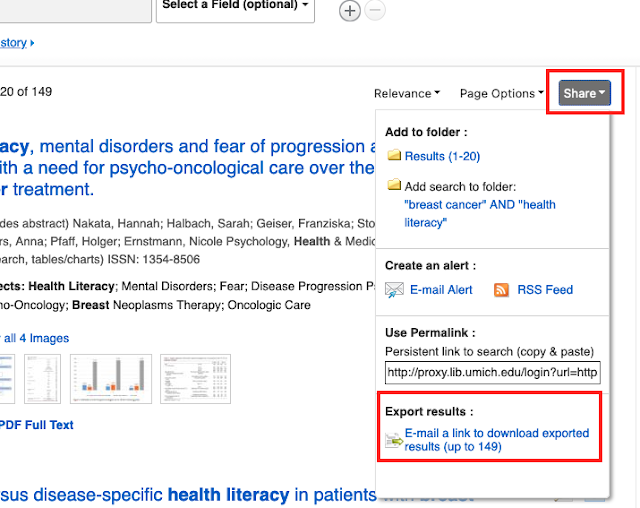
This topic comes up occasionally on Twitter and #medlibs listservs so I thought it would be good to make a post about it! Did you know that there is an email option for bulk exporting from EBSCO databases? It's not without its faults, but when it works, it can save you a lot of time (no more adding page-by-page of results into a folder!). Unless it is enabled for your institution, you may not even be aware that it is an option! From the upper right corner of your results list, click on the "Share" button and scroll down to "Export results." IF YOU DON'T SEE THE EXPORT RESULTS OPTION IN YOUR SHARE SCREEN , you will need to contact EBSCO Technical Support to enable this feature. You can export up to 25,000 records through this option. From the Export Manager screen, you'll be prompted to add your email address and select an output style: Then, hopefully within 5-10 minutes, you should receive an email from support@ebsco.com (make sure to check your spam ...

Tip #36: CINAHL Tertiary Headings

Image
Did you know that in addition to main headings and subheadings, CINAHL also uses tertiary subheadings? You've probably seen them in the Major and Minor Subject fields, but (if you are like me) you likely didn't notice them. In the example below, "Michigan" is a tertiary subheading linked to the heading "Colleges and Universities." At first glance it appears to be a subheading like "Prevention and Control," but in this case, it's actually different! This example shows the "Michigan" tertiary subheading linked to a heading and subheading: From the EBSCO help documentation ,  "Tertiary headings are used to indicate an age group or geographics . These headings are added when the age group or geographic area is key to the topic under discussion. The tertiary headings can be linked directly to CINAHL subject headings or to the end of a subject heading/subheading combination."  For example, these are the Age Group tertiary s...

Unsolved Mysteries: EBSCOhost auto-correct

Image
This week's tip is another contribution from our colleague Sandy Campbell  and her colleagues at the University of Alberta. Sandy writes: I don't think I sent you this one. It is another CINAHL weirdness. When I search Matis (which is the name of an Indigenous people), the first three results returned are "mates", but the 4th is MATIS. That one isn't the right subject, but you can see that it has interpreted the term matis as mates, as well as matis. It took me a while to figure out why when I was searching for South American Indigenous people, I got a paper on African rhinoscerous mates. "Matis" brings up 98 results. That should be enough to return a unique search. If you search Germa, it asks if you want to search Germa or Germany, but it doesn't do that with Matis So in my South American search hedge, I've ended up putting quotes around every term, just to be sure. Here are the numbers of  results returned by Sandy's search terms...

Tip #18: How to Float a Subheading in EBSCO's CINAHL

Image
by Andy Hickner Like MEDLINE and Embase, CINAHL's thesaurus includes optional subheadings. The syntax is as follows: MW "[2-letter subheading abbreviation]". For example, the syntax for the floating subheading "prevention and control" is MW "PC" (you can substitute MJ if for some reason you want to search for this subheading only in combination with a major heading). Here's what this might look like in a search for articles about prevention of catheter-associated urinary tract infection: The floating subheading is line S8, combined with equivalent keywords in S10, and finally combined with CAUTI elements in S11. Further information:  Advanced Searching with CINAHL® Subject Headings . Update: A reader asked me where to find the list of available subheadings. As usual with EBSCOhost, it is incredibly difficult to locate the CINAHL Database Information, so I am copy-pasting the list here: Code   Subheading   AB   Abnormalities   AM   Administration  ...