Posts

Showing posts with the label exports

Tip #58: Exporting a Random Set of Citations from Ovid Databases to Avoid Bias

Image
For evidence synthesis projects, it's critical for research teams to be in accord on eligibility criteria. I encourage my teams to perform a pilot screening of a subset of retrieved citations to identify where they may not agree before they undertake the formal screening process. This requires importing a sample of records to Covidence, our institutional evidence synthesis management tool.  The process I describe exports a random sample of records from an Ovid database to EndNote in order to convert the exported file to a compatible filetype (XML) for import to Covidence. Regardless of the reference and synthesis management tools you use, the steps I describe in Ovid remain the same. For pilot screening in Covidence, if I were to simply export the first 50 citations retrieved by a search, I may introduce selection bias.  According to Wolters Kluwer, owner of the Ovid platform, the last item added or updated in the database is the first displayed in the results when using Advan...
Tip #37: Bulk Export from EBSCO

Image
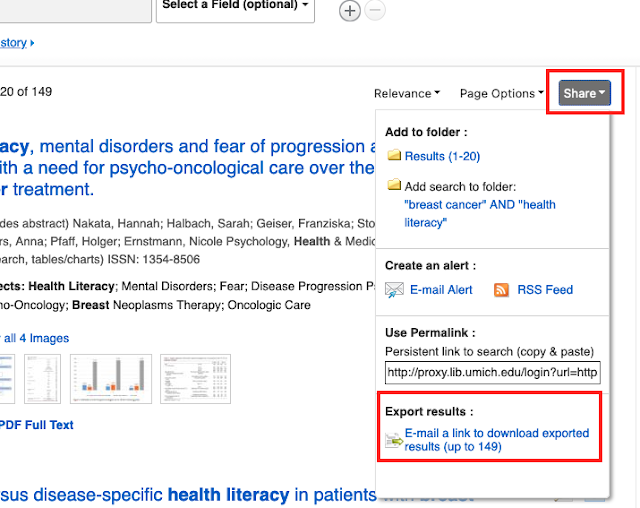
This topic comes up occasionally on Twitter and #medlibs listservs so I thought it would be good to make a post about it! Did you know that there is an email option for bulk exporting from EBSCO databases? It's not without its faults, but when it works, it can save you a lot of time (no more adding page-by-page of results into a folder!). Unless it is enabled for your institution, you may not even be aware that it is an option! From the upper right corner of your results list, click on the "Share" button and scroll down to "Export results." IF YOU DON'T SEE THE EXPORT RESULTS OPTION IN YOUR SHARE SCREEN , you will need to contact EBSCO Technical Support to enable this feature. You can export up to 25,000 records through this option. From the Export Manager screen, you'll be prompted to add your email address and select an output style: Then, hopefully within 5-10 minutes, you should receive an email from support@ebsco.com (make sure to check your spam ...

Tip #34: Increased .ris Exports in Scopus!

Image
 Have you been frustrated with exporting large numbers of Scopus search results as .ris into batches of 2000? Well, I've got some good news for you! Scopus has recently launched a new version of the Search results page which allows for exporting of up to 20K full document records in the CSV, TXT, BIB and RIS formats online. To switch over to the new results page, simply run a search, then click on the "Try the New Version" button at the top of the page.  You'll see that not only has the results page changed its look, but when you select your records for exporting, the form now allows you to export up to 20,000 in RIS format ! Check out this Scopus blog post to learn more - "Improved Scopus Export is ready to test drive"

Tip #7: Bulk Export from ProQuest

Image
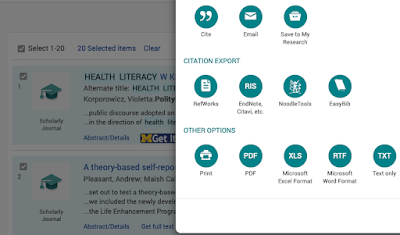
 ProQuest export limits got you down?  Did you know that ProQuest provides an export feature to help folks working on large literature review projects, like scoping reviews and systematic reviews, IF you (or your administrator) know about the setting!?  Administrators:  Log into the admin module and enable the option under the "User Interface" section:  Under the "My Research" section of the "Interface Settings, " you can enable the " Search results export functionality"  Searchers: Once the setting has been enabled, searchers will need to set up a " My Research" account to request a bulk export. After running your search while logged into your "My Research" account, you will see an "Export Results" button appear. Note: this only works for <10,000 results! recently increased to 20,000 results!     Don't forget to include "Abstracts "  The process for accessing the exported file is quite diff...