Posts

Tip #45: Exploding Subject Terms in EBSCO APA PsycInfo vs. EBSCO MEDLINE

Image
Positive update!  EBSCOhost APA PsycInfo, as of September 2025, offers what they're calling "Deep Explode." When explode is selected in the APA Thesaurus, all narrower terms are selected all the way to the bottom of the tree. Rather than being represented by a +, this explosion simply ORs together all the narrower terms in the search box itself. In what is now named (in all EBSCOhost databases in the new user interface) the Subjects authority, you can select the term and check the Explode box: Then use the Add to search button with OR selected in the drop-down menu. The main term and all narrower ones are added to the search box with the appropriate field code (DE), combined with OR. The search history, now called Recent activity, shows the search performed as expected. The information below is now out of date! Happy searching!

Tip #44 : Using LitSense for Sentence Retrieval from PubMed and PMC

Image
Many thanks to Erica Lake (Outreach Coordinator, NNLM Region 6 ) for this week's tip! LitSense is a free, web-based tool from NLM that enables simultaneous semantic searching of PubMed and PMC content. LitSense searches at the sentence-level rather than the article-level, allowing for direct retrieval of specific statements. And it searches by best-match and by meaning, retrieving articles containing sentences with an exact match of keywords as well as those with semantic similarity. Popular uses of this product Discover similar findings across different studies to compare and contrast. Locate and validate publications for evidence attribution. Identify MeSH terms and keyword variations for a PubMed search by reviewing the semantically similar results. Retrieve citations containing a phrase used by requestors when discussing their search topic or completing a search request form. Non-experts can type in a question as a sentence and retrieve relevant information without having to...

Tip #43: EMBASE (Ovid) Candidate Terms

Image
The Gist: Candidate terms can uncover relevant articles not retrieved using title, abstract, or keywords. The difference between word indexed and phrase indexed fields is really important, not just with candidate term fields, but with ALL fields.  In EMBASE, on Ovid, my favored fields are TI (title) , AB (abstract), KF (keyword heading word) and DQ (candidate term word). If you are curious about the KF field, Kate wrote about why you might use it rather than KW in Tip #4 . That keystroke heard around the world on the day Kate's blog dropped was the sound of searchers changing KW to KF.  Today's post, however, is about candidate terms, which Ovid defines as new concepts proposed during indexing and judged to be useful additions to Emtree (EMBASE's thesaurus). Over 100,000 candidate terms are proposed each year!  In addition to having their own fields (DJ & DQ), candidate terms are indexed in SH (EMBASE subject headings) and HW (heading word) fields. Since HW is one of ...

Tip #42: PubMed Subheadings and Explosion

Image
Many thanks to Molly K. Maloney, Pharmacy Liaison Librarian, University at Buffalo, mkm9@buffalo.edu, and Marijane White, Data and Research Engagement Librarian, Oregon Health & Science University, whimar@ohsu.edu for this week’s tip. Molly and Marijane would like to acknowledge and thank Barbara S. Reich, Director, Medical Library, Hackensack University Medical Center, barbara.reich@hmhn.org, Paije Wilson, Health Sciences Librarian, University of Wisconsin-Madison, paije.wilson@wisc.edu, and Michelle L. Zafron, Associate Librarian, University at Buffalo, mlzafron@buffalo.edu for their contributions to this conversation. In a recent post on the Expert Searching mailing list, Molly asked, "In helping a student craft a search that includes a MeSH term with subheading, I realized I was assuming the subheading carry over to the child terms when exploded. As an example, if searching for "Mental Disorders/pathology"[Mesh] will you also get "Anxiety Disorders/pathology...

Tip #41: Hyphens in Ovid EMBASE: the Long and Short of it.

Image
When is a hyphen not a hyphen? When it is a longer hyphen. Dashes range in size from the most narrow, known as a hyphen , to the the slightly wider en dash , to the widest em dash . The en dash is used to represent a span or range of numbers, dates, or time. The em dash can take the place of commas, parentheses, and colons. Unfortunately, neither is meant to appear in your search query in Ovid EMBASE .  Two-part or "hyphenated"  used-for terms in Emtree (EMBASE's thesaurus) on the Ovid platform appear to have either en or em dashes instead of hyphens. I discovered that if you paste one of these "hyphenated" terms into the search box, it returns an unsupported characters error .   For example, if you copy/paste  harmal−d , a used-for term for the medication  tamsulosin ,   into the search box, it will return an unsupported characters error. However, if you replace the long hyphen by typing the hyphen key, your search will work. I contacted Ovid Suppor...

Tip #40: Proquest change to set searching syntax

Image
Proquest has recently changed the query syntax for combining "set" searching from the search history. To reference a previous query in the session, you now need to enclose the set reference in square brackets .  To combine my previous queries in the example below, I must use [S1] AND [S2] AND [S3] .

Tip #39: Issues with Quotes in PubMed Query Builder

Image
Many thanks to Peter Johnson, University of Kansas Medical Center, @libraryvines@mindly.social for this week's post!  Within PubMed's Advanced Search query builder, terms may be attached to specific field tags, such as [MeSH] or [mh], and then applied to an ongoing string in the query box with specific boolean. Queries generated in this manner will appear without quotations around the entered terms. Ex. This non-application of quotations gives several considerations to an advanced searcher utilizing the query builder tool in PubMed.  Depending on the field tag used, an unquoted word or phrase may have automatic term mapping (ATM) applied to it. This can produce unexpected search results from the mapping, particularly for an unquoted term searched with the MeSH field tag where the mapping may apply to a MeSH's entry terms. The possibility ATM on an unquoted phrase attached to a field tag should be noted in each individual field tag's documentation .   A se...

Tip #38: Finding Unpublished Research Results in ClinicalTrials.gov

Image
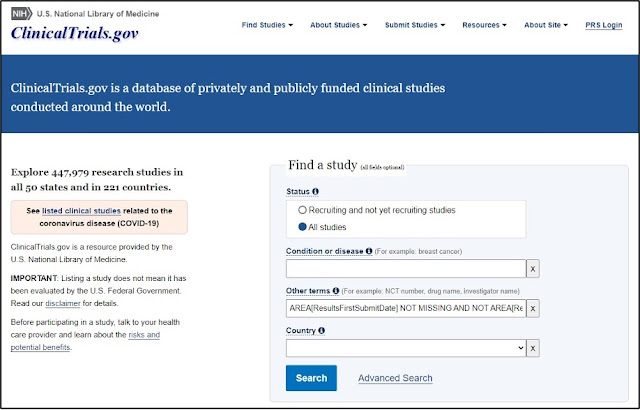
Many thanks to Erica Lake (Outreach Coordinator, NNLM Region 6), and Jimithy Hawkins and Allison Yu from the ClinicalTrials.gov product management team for sharing their expertise and time. ClinicalTrials.gov outlines how to find studies with results published in a medical journals . However, no details are provided on how to find studies with unpublished research results.  Never fear! It is possible to perform this search on both the classic and beta ClinicalTrials.gov websites. Classic ClinicalTrials.gov 1. Navigate to the Find a study search box on the homepage . 2. In the Other term s search field, enter the following search string as shown: AREA[ResultsFirstSubmitDate] NOT MISSING AND NOT AREA[ReferenceType] EXPAND[Concept] "Result" 3. Click the Search button. This search will retrieve all trials that have results posted but do not have any publications relating to those results. Some studies may include other types of publications, such as those relate...

Tip #37: Bulk Export from EBSCO

Image
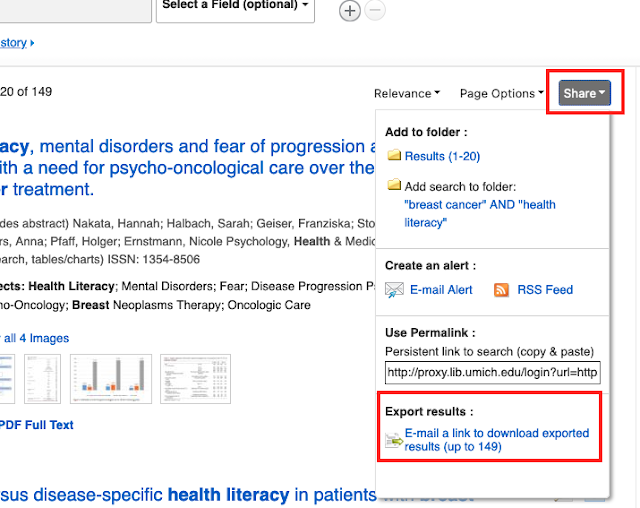
This topic comes up occasionally on Twitter and #medlibs listservs so I thought it would be good to make a post about it! Did you know that there is an email option for bulk exporting from EBSCO databases? It's not without its faults, but when it works, it can save you a lot of time (no more adding page-by-page of results into a folder!). Unless it is enabled for your institution, you may not even be aware that it is an option! From the upper right corner of your results list, click on the "Share" button and scroll down to "Export results." IF YOU DON'T SEE THE EXPORT RESULTS OPTION IN YOUR SHARE SCREEN , you will need to contact EBSCO Technical Support to enable this feature. You can export up to 25,000 records through this option. From the Export Manager screen, you'll be prompted to add your email address and select an output style: Then, hopefully within 5-10 minutes, you should receive an email from support@ebsco.com (make sure to check your spam ...

Tip #36: CINAHL Tertiary Headings

Image
Did you know that in addition to main headings and subheadings, CINAHL also uses tertiary subheadings? You've probably seen them in the Major and Minor Subject fields, but (if you are like me) you likely didn't notice them. In the example below, "Michigan" is a tertiary subheading linked to the heading "Colleges and Universities." At first glance it appears to be a subheading like "Prevention and Control," but in this case, it's actually different! This example shows the "Michigan" tertiary subheading linked to a heading and subheading: From the EBSCO help documentation ,  "Tertiary headings are used to indicate an age group or geographics . These headings are added when the age group or geographic area is key to the topic under discussion. The tertiary headings can be linked directly to CINAHL subject headings or to the end of a subject heading/subheading combination."  For example, these are the Age Group tertiary s...