Posts

Tip #25: Using Subheadings in PubMed
Image
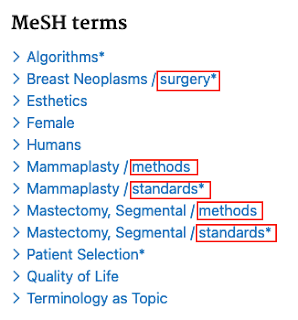
What is a Subheading? Subheadings allow searchers to improve the precision of a search that uses controlled vocabulary by further focusing on a narrower aspect of the topic. Here's an example of how subheadings (or qualifiers) are displayed for an indexed article in PubMed. Subheadings (highlighted in red) appear to the right of a slash following the Medical Subject Heading (MeSH). How to Use Subheadings in PubMed To build a PubMed search using subheadings, you have a few different options depending on the type of search you need. You can start from the MeSH database to build a search using Medical Subject Headings with subheadings applied. Find the MeSH term of interest, then from the record page you can select various subheadings that are relevant to that topic, and click "Add to search builder" to create the search. Click "Search PubMed" to run your search.     In the PubMed searches below, you'll see that the search with the " surgery " subhe...

(Re) Introducing the UX Caucus Issues Tracker!

Image
The UX Caucus, formally known as "Features & Flaws", launched a Google form Issues Tracker in early 2019 to help information professionals report and communicate usability problems with electronic resources. Our goals for the tracker included improving communication between information professionals and vendors; better-informed licensing decisions; and ultimately, better interfaces for all searchers. The initial version of this tracker also included an automatically generated analytics view that displayed aggregated form submission data.  In order to expand the tracker's audience, the MLA launched a pilot in early 2020 , where users were encouraged to not only submit UX issues, but also provide any feedback or suggestions to improve the tracking tool. After a period of about 6 months, we received nearly 40 issue submissions and some fantastic feedback to make the tool easier to use. Based on the pilot feedback, the UX Caucus team launched a revamped Issues Tracker ...

Tip #24: PubMed’s Phrase Index

Image
 Many thanks to Erica Lake (Outreach Coordinator, NNLM Region 6 ), and Amanda Sawyer and Jessica Chan from the NCBI PubMed team for this week's tip! Why is there a phrase index? The PubMed database contains more than 34 million citations and abstracts of biomedical literature and is growing by more than 1 million citations each year. PubMed uses a phrase index to provide efficient, cost-effective phrase searching while preserving system speed and performance for its 3.4+ million daily visitors. How does the phrase index work? Many phrases are automatically recognized by the subject translation table used in PubMed's Automatic Term Mapping (ATM ). For example, if you enter fever of unknown origin without enclosing it in double quotes, PubMed recognizes this phrase as a MeSH Term. You can bypass ATM and search for a specific phrase using the following formats: Enclose the phrase in double quotes: "kidney allograft" If you use quotes and the phrase is not found in the ph...

Tip #23: PubMed's [tiab] vs. [tw]

Image
Search field tags are a quick way to specify the exact fields you would like to search when using keywords. For example, I can tell PubMed to search for my term only in the title field or only in the MeSH Terms field. You can view a list of available search fields from the drop down menu in PubMed's Advanced Search Builder. Specifying field tags for keywords is also a good practice in PubMed because keywords searched without field tags will be translated through Automatic Term Mapping which may reduce the precision of your results. Here are a few sample searches in my search history, including #4 which wasn't limited to a field (notice how it was translated in the expanded search details): The fields that are included in the [title/abstract] fields are pretty self-explanatory (words and numbers included in a citation's title, collection title, abstract, other abstract and author keywords), but what is actually included in the [Text Word] (can also be searched as [tw]) fi...

Tip #22: Analyze search results in Ovid MEDLINE

Image
Ovid MEDLINE has a beta feature (reach out to your Ovid rep to place a request to enable it!) called Analyze which can be accessed to the upper right of search results: It is currently available for Advanced searches in Ovid MEDLINE only. Once it is enabled, perform an Advanced Search and you'll see the Analyze button above your search results. To disable it, you can treat it as you would any other INI setting or simply replace the word YES with the word NO. It will analyze up to the first 5,000 results of a search, providing MeSH and author keywords in order of frequency: I've started to use this in exploratory searching for 2 purposes. The first is to identify relevant MeSH and keywords I might not have thought of; the second is to provide my collaborators with a high-level sense of what the literature looks like. The latter can be useful when the initial research question is very broad or poorly defined, as is often the case with early-stage systematic or scoping reviews...

Tip #21: Term Finder in Ovid MEDLINE

Image
If you're like me and learned to use Ovid many years ago, you will sometimes miss new features on the platform. I learned about one of these features last week while participating in user testing for Ovid. The feature, Term Finder , is not new at all at this point - it was released in fall 2020!  Term Finder is an alternative way to look up MeSH in Ovid MEDLINE. It's located to the right of the search bar. It returns any mapped terms along with the various features -- the tree, entry terms, the scope note, available subheadings, etc. -- that we're used to navigating in the old step-by-step term mapping: I haven't had the opportunity to use the Term Finder for a search yet. As a single-line searcher who prefers to construct his searches in a text document rather than "on the fly" in the platform, however, it may end up making the process of gathering MeSH terms a bit more efficient. If you've used the Term Finder, let us know in the comments if you've f...

Tip #20: Stop Words within Phrases in Ovid

Image
 This week's tip is brought to us by Ursula Ellis from the University of British Columbia. She credits her colleague Mathew Vis-Dunbar for coming up with this solution! Thanks to you both! "If you search for an exact phrase which contains a stopword in Ovid, the stopword will be ignored and other words will be searched in the order entered, within 2 words of each other. For instance, line 1 of this search finds "treatment and prevention," "treatment or prevention," etc, but not "prevention and treatment" which is found by line 2: This is not ideal for many phrases in which the stopword is a critical piece of the search phrase. There are two options to solve this issue in Ovid. One is to get in touch with your rep and ask them to turn off "runtime stopword processing," as described here: https://wkhealth.force.com/ ovidsupport/s/article/ Stopwords-and-phrase- searching-in-Ovid-databases However, for large institutions, it i...

Tip #19: Test for changes to Automatic Term Mapping in PubMed using Mapping Tester

This week, we are highlighting a new tool developed by our colleague Edwin Sperr. Ed's Mapping Tester helps searchers identify any changes in automatic term mapping (ATM) in the new PubMed compared to "old" PubMed. Check out Ed's blog post for a discussion of the changes to ATM, a detailed description of the Mapping Tester, and examples of how it works.  We're interested in more posts about the changes to ATM and how you're adapting to them; if you'd like to contribute a tip, email Andy at: alh4014 AT med.cornell.edu.

Tip #18: How to Float a Subheading in EBSCO's CINAHL

Image
by Andy Hickner Like MEDLINE and Embase, CINAHL's thesaurus includes optional subheadings. The syntax is as follows: MW "[2-letter subheading abbreviation]". For example, the syntax for the floating subheading "prevention and control" is MW "PC" (you can substitute MJ if for some reason you want to search for this subheading only in combination with a major heading). Here's what this might look like in a search for articles about prevention of catheter-associated urinary tract infection: The floating subheading is line S8, combined with equivalent keywords in S10, and finally combined with CAUTI elements in S11. Further information:  Advanced Searching with CINAHL® Subject Headings . Update: A reader asked me where to find the list of available subheadings. As usual with EBSCOhost, it is incredibly difficult to locate the CINAHL Database Information, so I am copy-pasting the list here: Code   Subheading   AB   Abnormalities   AM   Administration  ...